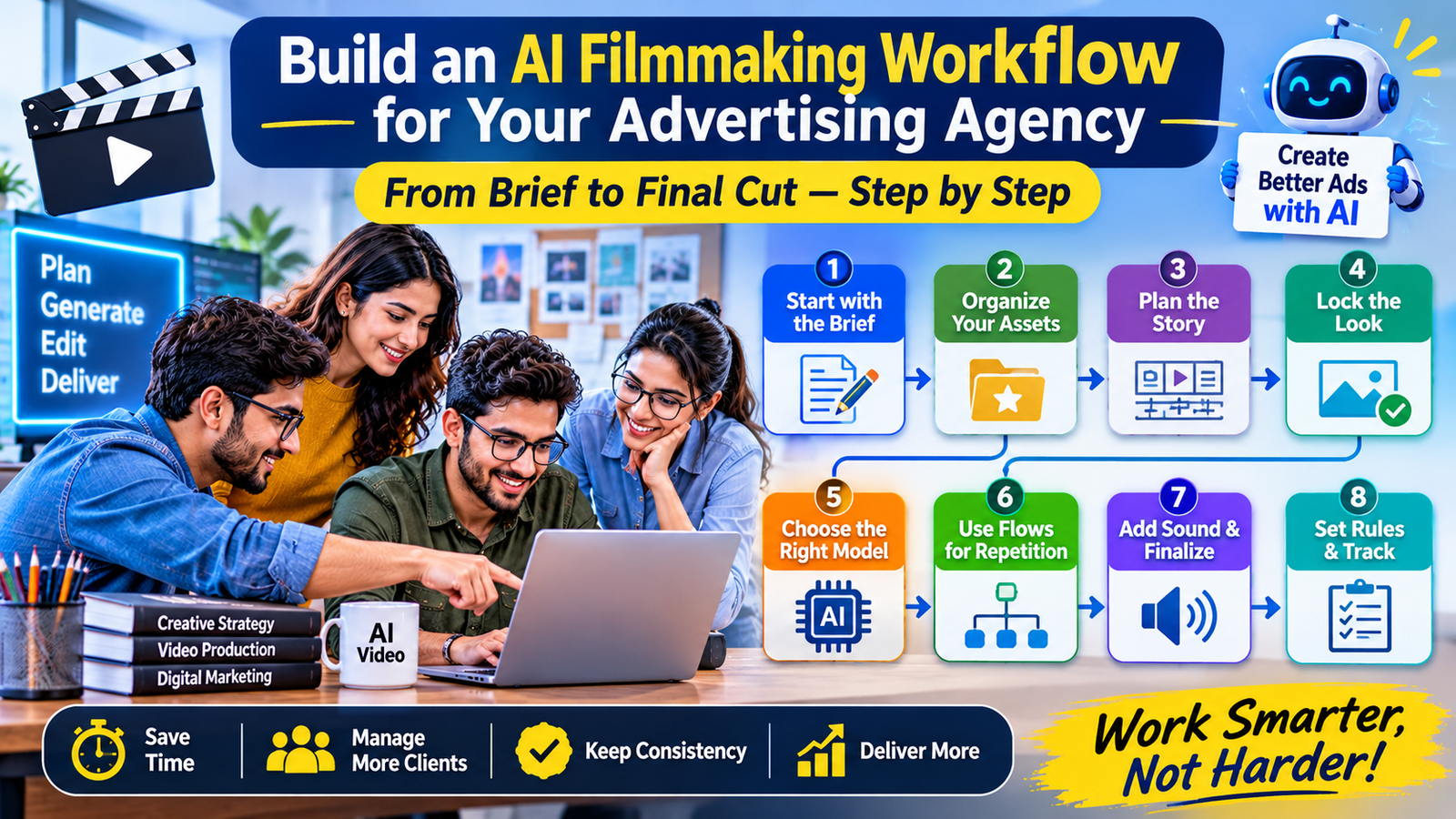
Most advertising agencies already know how to make a good ad. What many don’t have yet is a repeatable way to make good ads with AI. They try a model here, a tool there, and the results are uneven. One week a clip looks great, and the next week the same prompt gives something nobody can use.
The fix is rarely a better prompt. It is a better workflow. This guide walks through how to build one, step by step, using AI filmmaking software as the base. You can follow it whether you’re a five-person studio or a larger team.
Why a workflow matters more than a tool
A tool makes a clip. A workflow makes a campaign.
Ads need several things at once: a concept, a consistent look, many shots, sound, different sizes and sometimes different languages. If each of these lives in a separate app, the team spends its time moving files around instead of making decisions.
A workflow gives each stage a place and an owner. It also means that when a new client arrives, you don’t start from scratch. You copy a process that already works.
Step 1: Start with the brief, not the model
Before opening any software, write the brief down. It sounds obvious, but many AI projects begin with “let’s see what this model can do,” and that is how time gets wasted.
A useful brief includes:
- The product and the one message it must carry
- The audience and the platform where the ad will run
- The tone and look, with a few reference images
- The sizes needed, such as 9:16, 16:9 and 1:1
- Any languages, and the deadline
Neither the model nor the prompt can fix a vague brief. If the client isn’t sure what they want, ask for approval on a short script and a few reference frames first.
Step 2: Set up a shared home for every client
The next step is to pick one place where each client’s material lives. Logos, product photos, character references, past approved ads and brand rules should all sit together.
Platforms such as Lemonpeel support this through an Asset Reference System, which stores and reuses assets across teams, and a Brand Kit, which keeps logos, type and palette locked across every render. Both matter, because they stop one person’s “close enough” from becoming the client’s complaint.
If your team works with several accounts at once, this step is where order starts. Not only does a shared library save search time, but it also gives new team members a fast way to get up to speed.
Step 3: Plan the story before you generate
Once the brief and assets are ready, move to scripts and shot lists. Write the hook, the middle and the call to action. Then break them into shots, with a short description for each.
This is also the stage to decide how many versions you need. An ad for Instagram Reels may need a different hook than one for a TV-style spot, even if the product is the same.
Lemonpeel’s Text tools cover scripts, hooks and shot lists, so the planning can happen in the same workspace where the video will be made. Doing this inside the same project means the plan and the footage stay linked.
Step 4: Lock the look and the characters
Here is where many AI ad projects go wrong. Without fixed references, every shot is a new roll of the dice.
Before generating video, choose the character images, product shots and style frames that the client has approved. Then use them for every shot. A feature like Character Consistency, which aims to keep one face across a whole sequence, helps when an ad has a recurring person or mascot.
For product ads, the same idea applies to the product itself. If the bottle, shoe or phone looks slightly different in each shot, viewers will sense something is off, even if they can’t say why.
Step 5: Choose the right model for each shot
No single model is best at everything. Some are stronger with motion, some with faces, and some are fast enough for cheap drafts.
An agency workflow should say, in plain words, which model is used for which job. Lemonpeel lists several video models, including Seedance 2.5, Kling 4, Hailou 3 Max, Wan 3.0 and Gemini Omni Flash 1.1, so the team can switch per shot without opening a new product.
A simple approach works well:
- Use faster, cheaper models for rough drafts and client previews
- Use stronger models for final shots
- Use tools like Camera Control or Motion Control when a shot needs a different angle or specific movement
Keep the list short. Having ten options sounds flexible, but it slows decisions.
Step 6: Turn repeated steps into Flows
Now comes the part that saves the most time over a year. If you make a similar type of ad every week, save the process.
Flows let you chain steps once and run them again with new inputs. The site lists ready-made examples, such as Storyboard to Film, Multi Shot Builder, Multi Shot Vertical and Studio Pack, which is aimed at product-focused content. Whether you use these as they are or adjust them, the principle is the same: do the thinking once, then reuse it.
Teams with developers can go a step further, since a Flow API and MCP & CLI support let other systems connect to these workflows.
There is also Lemonpeel Agent, which is marked as new. It is designed to take a brief, pick models, run generations and return with a cut. Since it’s new, test it on a low-risk job first, and treat its output as a first draft that a person reviews.
Step 7: Add sound, then finish for every platform
An ad without good sound feels unfinished. Plan voice, music and effects early, not at the last minute.
The platform lists Speech for voices in many languages, Clone Voice from about ten seconds of input, and Music & SFX Studio for licence-free music synced to video. For multilingual campaigns, Translate & Lipsync and Subtitles cover 100+ languages.
After the master film is approved, create the other versions. Reframe & Resize gives every ratio from one master, Edit Video handles trimming, grading and assembly, and Topaz Upscale is there for quality. If you finish all of this in the same workspace, you avoid another round of exporting and re-uploading.
Step 8: Set rules for people, approvals and cost
A good workflow also covers people. Decide who can generate, who approves, and who has the final say. Agree on how many revision rounds are included before work starts, so feedback stays specific.
Team Controls manage members, credits and creative control, which helps stop credits from disappearing into random tests. The Agency plan lists unlimited projects, unlimited seats, a shared asset library and credit top-ups, and the site shows it at ₹9,999 per month. Prices can change, so check the pricing page first.
Keep a simple record for each project: the brief, the approved references, the models used and the final files. When a client returns six months later, you’ll be glad you did.
A quick checklist you can copy
Before any ad goes into production, check that you have:
- A written brief with sizes, languages and deadline
- A shared folder of approved brand and character references
- A script and shot list, signed off by the client
- A decision on which models handle which shots
- A saved workflow for anything you’ll repeat
- A plan for sound and subtitles
- A named approver and a limit on revision rounds
Where things can still go wrong
No workflow removes every problem. AI footage can still drift, and some shots need several tries. Either you build review time into the schedule, or the client will find the mistakes first.
Some clients also have rules about AI-generated content, so ask early. For work that depends on real people in real places, a camera may still be the better choice, and many agencies combine both.
The bottom line
Building an AI filmmaking workflow isn’t about finding the single best model. It’s about giving each stage of an ad a clear place, from the brief to the final cut. Good AI filmmaking software for agencies keeps assets shared, characters steady, steps repeatable and delivery simple, so the team spends its energy on ideas. Start with one real project, follow the steps above, and keep notes on the hours you save.
Frequently asked questions
What is an AI filmmaking workflow for an advertising agency?
It is a repeatable process that takes an ad from brief to delivery using AI tools, covering scripts, references, video generation, sound, editing and export in a connected way. A good workflow keeps assets, characters and brand rules consistent across every project.
What features matter most in AI filmmaking software for agencies?
Look for several video models, character consistency, a shared asset library, brand controls, team seats and credit management, reusable workflows, and built-in editing, subtitles and resizing. These features reduce handoffs and help several people work on the same project.
Can an agency build this workflow without a technical team?
Yes. Most steps, such as planning, generating and finishing, happen inside the platform without code. A technical person only becomes useful if you want to connect the workflow to other systems through tools like an API.